Connect Stripe to Get Paid
Connect Stripe so clients can pay for inspections directly through Hometrace.
Updated May 18, 2026 · 2 min read
Connect Stripe to accept inspection payments through Hometrace. Stripe handles verification and payouts to your bank account.
What you need
Have your business details, any identity information Stripe requests, and a bank account for payouts ready. Requirements and verification time depend on your account.
Connect your account
- Open Settings > Services and payments and select Payments.
- In Stripe, choose Create a new account or Connect an existing account.
- Follow Stripe’s prompts to complete or connect the account.
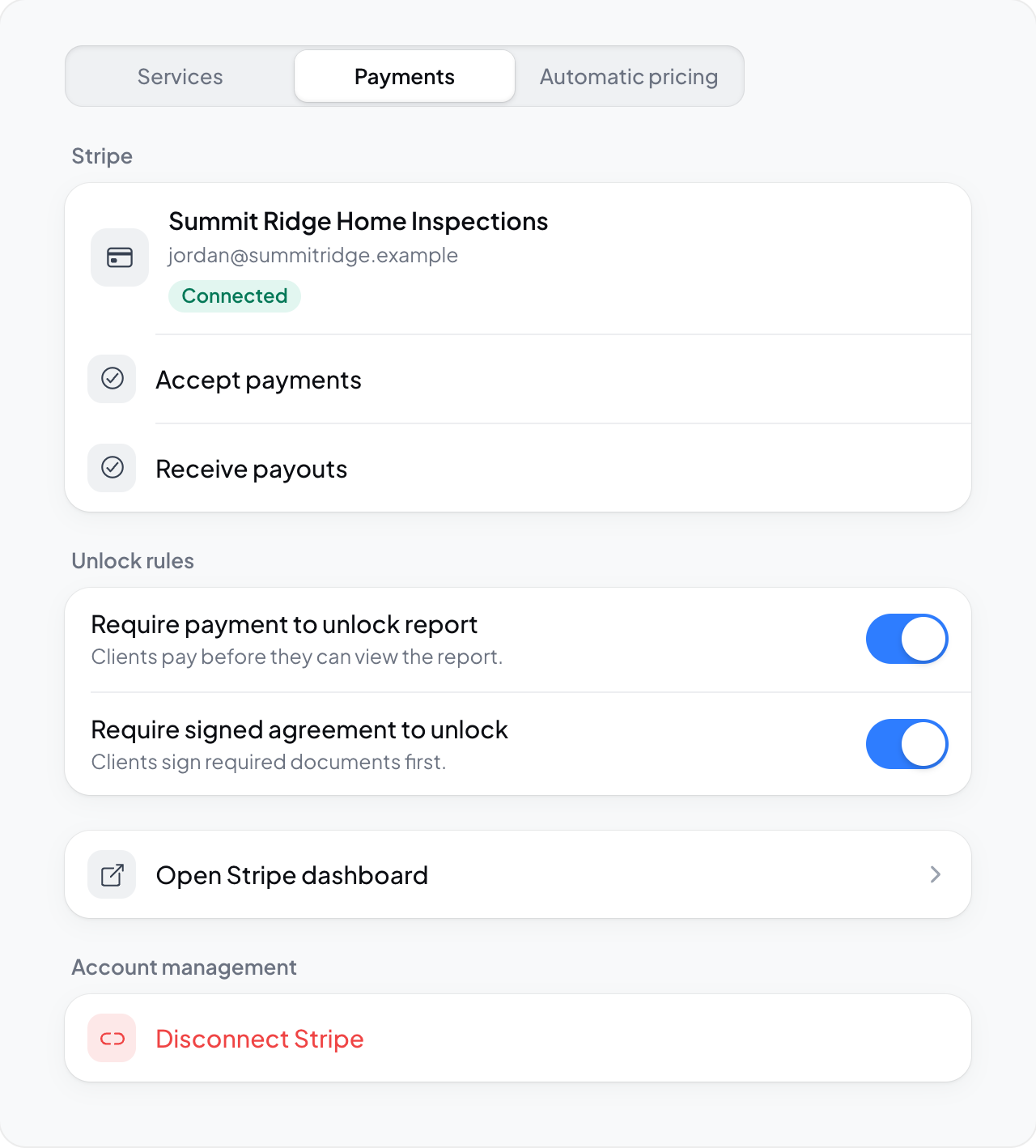
- Return to Hometrace. Check the Connected status and the Accept payments and Receive payouts capabilities. If Stripe needs more information, use Open Stripe dashboard to finish setup.
A Connected label alone does not mean every payment or payout capability is enabled. Resolve outstanding requirements before requesting client payments.
After setup
The Payments tab shows Balance and Payout history. Open Stripe dashboard for account details and additional management. Request payout and Instant payout are available when the account and available balance are eligible. Review the fee displayed before confirming an instant payout.
For inspection invoices, external payments, refunds, and processing costs, see Payment Processing.
Subscription billing is separate
Connecting Stripe lets your business collect inspection payments. It does not set up your Hometrace subscription. Manage that under Settings > Billing & Subscription.