
Trying new software alongside your current tool
Keep your existing software while you test Hometrace on your own template and inspections. Compare the report, review time, and offline behavior.
Keep your current inspection software while you try a replacement. You can test a new tool on your own work without moving every job or cancelling the subscription you already depend on.
Hometrace's 30-day trial for new accounts gives you time to check the report process. Start it when you have inspections on the calendar so you can test more than the sample inspection included with the account.
Set up enough to test properly
Import your template if you have an export, or begin with a standard template to learn the screens. Add your logo and the information you need for a test inspection. You can refine the setup as you discover what matters to your routine.
Before using an imported template for client work, check its structure and narrative library. Make sure the findings use your wording and severities. Open a completed report to see how those choices appear to a reader.
You can test report delivery without connecting Stripe. Payment setup can wait until you are ready to evaluate that part of the service.
Compare one familiar job
Choose a straightforward property you have permission to use for the comparison. Keep your current software as the system you rely on for the client's report while you learn Hometrace.
Record the same conditions in the trial. Check where photos land, how spec answers work, and whether draft findings save you effort after review. Include any time spent correcting suggestions in your notes.
Read both reports. Look for omitted observations, awkward recommendations, or wording that does not sound like you. A quick draft still needs to communicate the inspection accurately.
Try the awkward parts
Prepare an inspection while connected, then test capture without signal. Reconnect and confirm the queued work reaches the report. Photo analysis, Agent, and Final Checks need a connection, so include those steps after uploads finish.
Try a larger set of photos too. Return to a completed inspection and find a detail as if a client had called with a question. Those tasks tell you more about everyday use than a tour of the dashboard.
Check the report on a phone as well as your computer. Your company name and logo appear in the report, but Hometrace attribution remains. Make sure the presentation suits your business before sending it to a client.
Test your exit before deciding
In Settings, open Data Management and try Full Data Export. Photos are optional, so select them if you want an archive that includes the files.
Inspect the downloaded archive and check for failed files. An export finishing does not establish that every photo was included. Confirm that the information you need is present and readable before treating it as your backup.
Keep copies of reports delivered from your current software too. Ask what happens to client links and account access when you cancel either service.
Make the decision from your own results
Compare the reporting time, including review, and the quality of the finished report. Note anything that repeatedly needed a workaround. Keep both subscriptions through the overlap until you have tested the new process sufficiently for your work.
If setup is holding up the trial, contact Nick or Sam with your template and a specific inspection to work through. Use that job to decide whether Hometrace fits.
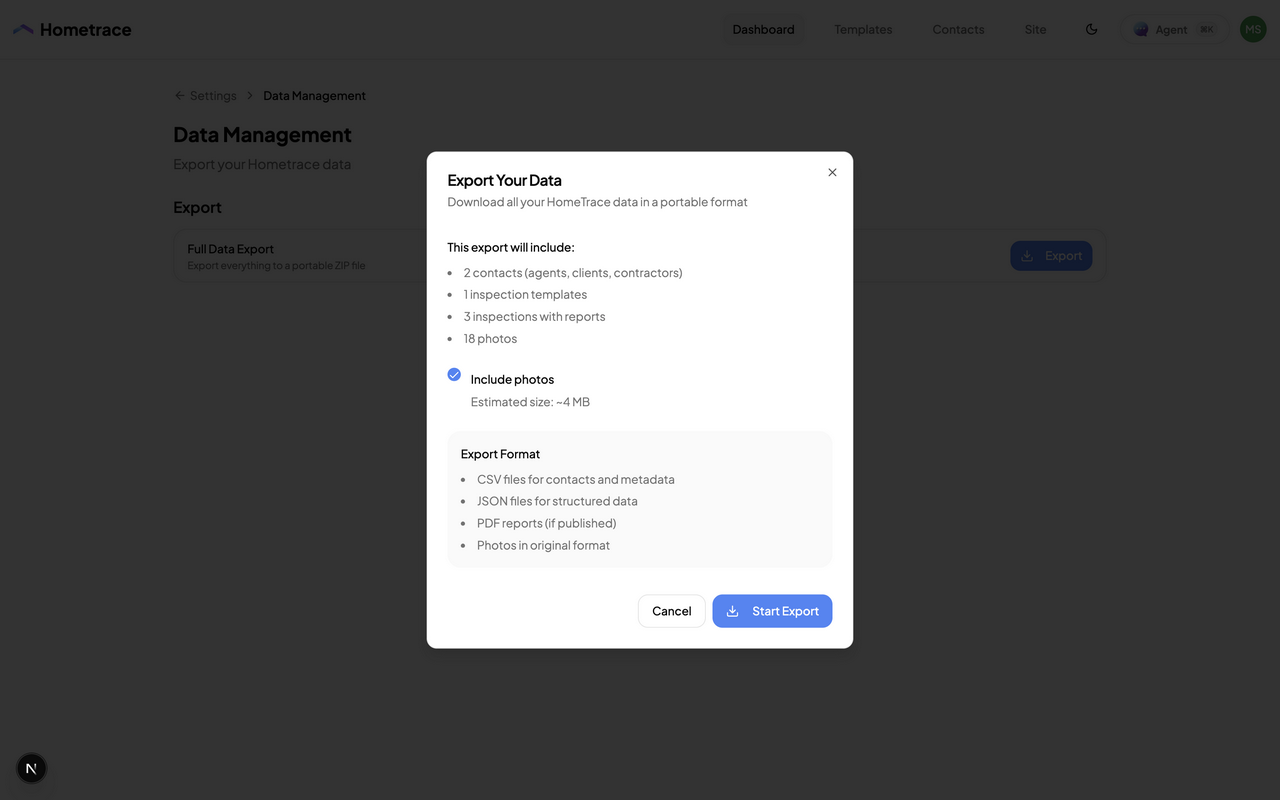
Test the export during your trial and choose whether to include photos.